REVIEW · VENICE
Venezia Audioguide – TravelMate app for your smartphone
Book on GetYourGuide →Operated by MyWoWo Srl · Bookable on GetYourGuide
Venice with no waiting in lines.
This smartphone audioguide lets you explore Venizia at your pace, with no paper ticket pickup and the freedom to listen online or offline whenever you feel like it. I like that it’s built for autonomy—you start straight away from wherever you are and you replay as often as you want.
The experience is also good value for your time. You get 85 audio pieces (255 minutes total), plus you can read the text inside the app, and there’s a quiz section to keep you paying attention. One drawback to keep in mind: some content has raised accuracy concerns in a few specifics (for example, a claim about number of steps near St. Mark’s), so treat it as a guide for context and curiosities, and don’t bet on it for precise measurements.
In This Review
- Key things I’d clock before you download
- Starting Venezia right from your phone
- How the audio guide works: online, offline, repeatable
- 255 minutes of Venice coverage, mapped to places you’ll recognize
- A practical listening route: where each stop adds meaning
- St. Mark’s cluster: start with context
- Rialto Bridge and the Grand Canal: learn the city’s big axis
- Palaces and art stops: Cà D’Oro, Cà Rezzonico, and beyond
- Churches and schools: San Sebastiano, San Zanipolo, and the Scuole
- La Fenice, Biennale, and Arsenal: the cultural side
- Murano and the Ghetto: widen the Venice picture
- Cuisine track: don’t ignore the food audio
- The quiz and the text view: how to make it stick
- Languages, headphones, and wheelchair access that you can plan around
- Price and value: is $6 a smart move here?
- Who this works best for
- Should you book this Venice smartphone audioguide?
- FAQ
- How do I get my activation code?
- Is there a meeting point?
- Can I listen offline?
- How much audio content do I get?
- Which languages are available?
- How long does the guide stay valid?
Key things I’d clock before you download

- No meeting point, no ticket desk: start your Venice walk whenever you want
- 85 audio files / 255 minutes: enough content to build a full day (or stretch across many)
- Offline listening: you can keep going without hunting for a signal
- Text + audio: you can switch how you take in the story
- Replay for years: validity runs for 1095.5 days from first activation
- A quiz to keep you engaged: short questions help reinforce what you heard
Starting Venezia right from your phone

This is a straightforward idea done well: you download TravelMate on your phone and use it as your personal audio companion around Venice. There’s no meeting point listed for the start—your “tour” begins the moment you activate the content—so you’re not stuck timing yourself to a group or a guide’s schedule.
To use it, you’ll need the TravelMate app (called TRAVELMATE on Android, and TRAVELMATE TM on iOS) and an activation code. The code is found in your email: open the activity details (or the area where tickets are shown), then tap the large barcode in the orange frame. You’ll see the 10-digit activation code just under that barcode. If you used the GetYourGuide app, you may also access the activation code there under the ticket view.
Practical tip: install the app and test playback before you leave. Venice days are busy enough—small friction in the moment is annoying.
You can also read our reviews of more tours and experiences in Venice



How the audio guide works: online, offline, repeatable
One of the best parts here is that the guide is flexible. You can listen online or offline, which matters a lot in Venice where mobile coverage can be patchy in narrow streets and inside crowded areas. Offline use also helps if you don’t want to stress about roaming data.
The guide also doesn’t feel like a one-and-done rental. The audio you activate stays valid for 1095.5 days from first activation (about three years), and you can use it as many times as you want. That’s a big deal if you plan to:
- do Venice once and return later with a different route
- break the listening into short chunks across multiple days
- show the same content to someone else without re-buying
You’ll also get an option to read the text of the audio files in the app. When you’re standing still for a minute—say, outside a church or museum facade—text can work better than audio. And if you’re in a loud moment (Venice always has background noise), you can glance at the screen to stay on track.
Finally, earphones are recommended. Not because it’s fancy, but because it keeps the experience clear for you.
255 minutes of Venice coverage, mapped to places you’ll recognize

The content includes a Venice introduction and then moves through a mix of major sights and specific Venice “flavors,” including local cuisine. The app’s total package is 85 audio content pieces, totaling about 255 minutes, which is enough to create a meaningful self-guided day if you listen for around an hour plus breaks.
Here are the places covered (all included in the audio library):
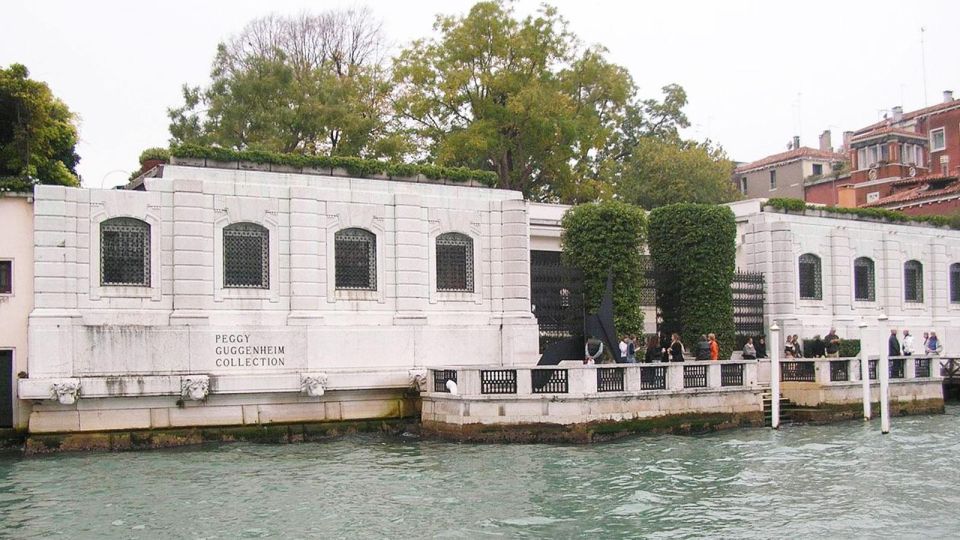
Venice introduction; Wonders of local cuisine; Accademia Gallery; Arsenal; Basilica of the Friars; Biennale; Cà D’Oro; Cà Rezzonico; Correr Museum; Doge’s Palace; Grand Canal; Guggenheim; La Fenice Theater; Marciana Library; Murano; Rialto Bridge; San Sebastiano; San Zanipolo; Scuola di S. Giorgio degli Schiavoni; Scuola Grande di San Rocco; St. Mark’s; The Ghetto.
What that means for you: it’s not just “one monument tour.” It’s designed so you can build your day around what you actually want to see—palaces, museums, churches, neighborhoods, and even a cuisine angle. If you prefer a visual route, you can listen as you pass by. If you prefer museums and indoor time, you can use audio while you stand and look.
A practical listening route: where each stop adds meaning

The app doesn’t force you into a rigid order (it’s self-guided), so I like to think of it as a menu. Here’s a way to string the highlights together so your listening feels connected rather than random.
St. Mark’s cluster: start with context
Begin with St. Mark’s, then move toward related icons you’ll spot nearby, like Doge’s Palace and Marciana Library. Starting here works because the app’s “Venice introduction” and St. Mark’s area context can help everything else click faster.
One caution based on the content feedback: a review raised doubts about the precision of at least one specific detail near St. Mark’s (the number of steps to reach a tower). So if you care about exact numbers, don’t treat the audio as your only source—use it for story and atmosphere, not for strict measurement.






Rialto Bridge and the Grand Canal: learn the city’s big axis
Next, take on Rialto Bridge and Grand Canal. This is where Venice can feel most “legendary” from a distance. Hearing the audio here helps you understand what to look for, not just where to stand for photos. If you’re the type who gets overwhelmed by landmarks, this is a good anchor zone.
Palaces and art stops: Cà D’Oro, Cà Rezzonico, and beyond
As you wander, you can weave in:
- Cà D’Oro
- Cà Rezzonico
- Correr Museum
- Guggenheim
These tend to pair well because Venice palaces and museums can blur together if you don’t have a thread. The app’s structure—history, points of interest, and curiosities—helps you keep track of why each stop matters.
Churches and schools: San Sebastiano, San Zanipolo, and the Scuole
For something quieter and more “Venice lived-in,” listen around:
- San Sebastiano
- San Zanipolo
- Scuola di S. Giorgio degli Schiavoni
- Scuola Grande di San Rocco
This is also a good moment to slow down. The audio can give you context while you’re standing close enough to notice details. And because the guide includes text in the app, you can switch modes if your surroundings are too noisy.
La Fenice, Biennale, and Arsenal: the cultural side
Venice isn’t only churches and canals. The guide covers:
- La Fenice Theater
- Biennale
- Arsenal
If you’re more interested in art and culture than architecture-only sightseeing, these tracks can make your day feel more complete. They’re also useful when you’re deciding whether a museum stop is “worth it” for you—your ears can tell you what each place is about before you commit time inside.
Murano and the Ghetto: widen the Venice picture
Two of the most important expansions in your listening library are:
- Murano
- The Ghetto
These can help you see Venice as more than a single postcard. Murano adds a separate island perspective, and The Ghetto gives you a different kind of historical lens. If you only stay in the central highlights, you can end up with a Venice that feels too one-note—these topics help prevent that.
Cuisine track: don’t ignore the food audio
Finally, don’t skip the Wonders of local cuisine audio. Even if you’re not planning a huge food tour, this track can make meals feel more meaningful. It’s a good “reset” listening choice when you’re heading toward a snack break and want something that isn’t tied to standing in front of a building.
The quiz and the text view: how to make it stick

This app isn’t just passive audio. There’s a quiz section with short questions you can play and learn from. That’s handy in Venice, because it’s easy to see a lot and remember very little.
The text view is another practical feature. When you’re walking, audio is great. When you pause—at an overlook, at a bridge entrance, in a courtyard—it helps to read along. It also reduces the chance you miss a name or place when street noise is loud.
If you want better retention, do this simple pattern:
- listen to a stop
- pause briefly and check the text for the key place name
- then hit the quiz section later in the day
No fancy planning required—just a small rhythm.
Languages, headphones, and wheelchair access that you can plan around

TravelMate includes audio in Chinese, English, French, German, Italian, Russian, and Spanish. That’s broad coverage, and it means you can switch languages if you’re traveling as a duo with different preferences.
Earphones are recommended, which is practical in Venice where you’ll be close to other people. If you share spaces with others (on bridges, near entrances, on public walkways), private audio is more comfortable for everyone.
Accessibility is explicitly noted: the activity is wheelchair accessible. For you, that translates to easier planning if mobility needs are part of your trip design. (As always, Venice streets and crossings can still be uneven—use common sense and go slow.)
Price and value: is $6 a smart move here?

At $6 per person, this is one of the most budget-friendly ways to add guided context to Venice. Here’s the value logic that matters:
- You’re paying for 255 minutes of audio, not a timed guided walk that ends quickly.
- You keep access for 1095.5 days from first activation, so you can revisit or reuse the guide later.
- You don’t deal with a meeting point or ticket pickup, which saves time and stress on arrival.
- You can listen online or offline, giving you control over your day and your data use.
The main “value risk” is quality consistency. The content sounds entertaining and well written for a basic orientation, but one pointed concern was accuracy of specific details (numbers). At this price, I’d still call it good value—as long as you treat it correctly: use it to understand what you’re seeing, not as an authority for exact measurements.
If you’re the type who wants a strict, fact-precise lecture, you might prefer a live guide for certain moments. But if you want help seeing Venice with less guesswork, this hits the sweet spot.
Who this works best for

This audioguide app is a great match if you:
- like exploring at your own pace
- want context while walking between major sights
- prefer audio you can replay later
- need flexibility (offline listening, no group timing)
It’s also a good choice if you’re traveling light and don’t want to carry anything physical. The “no paper ticket” idea is more than convenience—it helps you avoid small arrival hassles when Venice is already chaotic.
Should you book this Venice smartphone audioguide?

I’d book it if your priority is self-guided structure at a low price. The guide’s strength is that it covers a lot of the city by name—St. Mark’s, Doge’s Palace, Rialto Bridge, Murano, The Ghetto, and more—so you can build a day without feeling lost.
I’d pass or pair it with other sources if you need exact, technical facts for one or two high-stakes details. The content seems solid for general understanding, but the accuracy question near St. Mark’s is the kind of issue you shouldn’t ignore.
Bottom line: for $6, this is an easy add-on for making Venice feel less random. Download, test your sound, and use it like a companion—not a textbook.
FAQ
How do I get my activation code?
Your activation code is included in the email. Open the activity details (or the area to show your tickets), then tap the large barcode in the orange frame and find the 10-digit code just under the barcode. You can also find it via the GetYourGuide app if you access the ticket in the app.
Is there a meeting point?
No. There’s no meeting point listed for the start. You download the app and begin your experience wherever you are.
Can I listen offline?
Yes. The audio guide can be used online or offline.
How much audio content do I get?
You get 85 audio content items with a total duration of 255 minutes.
Which languages are available?
The audioguide is available in Chinese, English, French, German, Italian, Russian, and Spanish.
How long does the guide stay valid?
It’s valid for 1095.5 days from the first activation, and you can use it as many times as you want during that period.